Lanterns lit Tutorial
Find roleplay right now
Roleplay is best together, but finding each other in game isn't always easy. That is what Lanterns lit is for. In game and up for roleplay? Light your lantern and say where to find you. Everyone on the Archives can see at a glance who is out there right now, and where to go. A lantern burns for one, two or three hours and goes out by itself.
Where the lanterns are
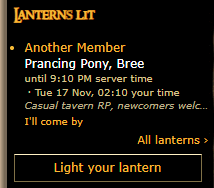
On a computer, the lanterns are in the left column, in the box Lanterns lit right under Who's online. It shows up to three lanterns, each with the name of the character who lit it, where they are, until when it burns (in server time and in your own time) and their note. All lanterns opens the page with every lantern, which you also find under Community, then Lanterns.
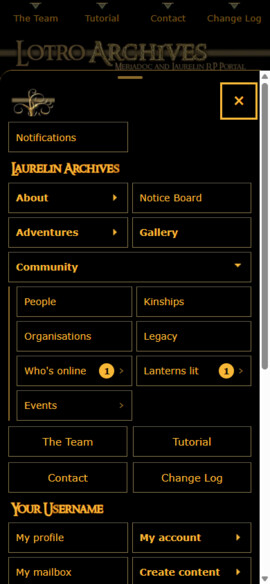
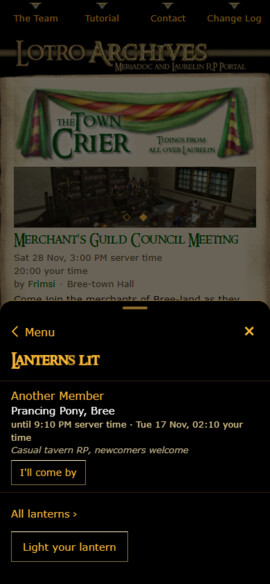
On phones, tap Menu, then Community, then Lanterns lit. The number beside it tells you how many lanterns are lit right now.
Everyone can see the lanterns, also visitors who are not logged in, so a lantern may well draw in a new player. To light one, you need to be logged in.
Lighting your lantern
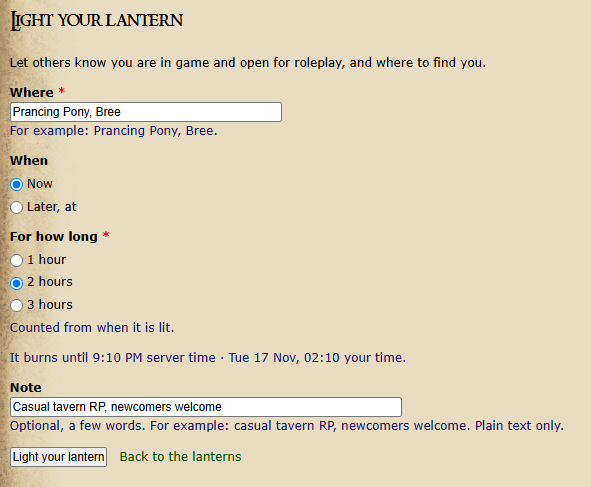
Press Light your lantern, under the lanterns in the left column, on the Lanterns page or in the phone Menu, and fill in:
Where: where to find you, for example Prancing Pony, Bree. Places that are used often are suggested as you type.
When: Now, or Later, at a time in the next twelve hours. The time is in server time, and the form shows your own time under it.
For how long: 1, 2 or 3 hours, counted from when it is lit. The form tells you until when it burns.
Note: if you like, a few words, for example casual tavern RP, newcomers welcome.
Then press Light your lantern.
You can have one lantern at a time, and light up to four a day.
I'll come by
Found a lantern you'd like to join? Press I'll come by under it, so that they know you are on your way. It then says Coming; press it again to take your name off. On your own lantern you see who is coming by.
Changing or putting out your lantern
Plans changed? Press Change your lantern (where Light your lantern was), change where, when, for how long or the note, and press Save changes. Done for the evening? Press Put it out on that form, or press Put it out beside your lantern on the Lanterns page and confirm. Otherwise your lantern simply goes out by itself when its time is up.
A notification when a lantern lights up
Would you like to know when someone lights their lantern? Go to My account, then Preferences. Under Notifications and e-mail, tick Notify me when someone's Lantern lights up and press Save.

It is off until you tick it. Once ticked, you get a notification under the bell beside your name (on phones: on the Messages tab) whenever someone lights a lantern or sets one for later, and also a push on your phone or computer if push notifications are on. It never sends an e-mail. How to install the app and turn on push notifications is explained in the Phone app & notifications tutorial.