The Lorekeeper Plugin
Lorekeeper keeps notes on the characters your character meets: who they are, what they are known as, how you know them and what happened. Target someone you have written about and a small card reminds you.
- Notes on what your character knows and out-of-character notes, with a relationship from Friend to Enemy
- Race, class and level filled in when you target them, and when you last heard them in chat
- An A to Z index and a search through names and notes
Use a computer for this
Installing needs a computer or laptop with LOTRO on it. Open this page there: laurelinarchives.org/plugins/lorekeeper
A window opens. Go to Documents > The Lord of the Rings Online and click Select Folder.
An update is waiting: click Update Lorekeeper.
Everything is up to date.
Installed.
In LOTRO, type /plugins manager, find Lorekeeper in the list and press Load (or type /plugins load Lorekeeper). Tick it to load automatically if you like. The Lorekeeper window and its button appear. Click the button, or type /lore, to open or close the window. /lore off hides the button.
In game, type /plugins unload Lorekeeper and then /plugins load Lorekeeper (or log in again) to use the new version. Your notes and settings stay.
This browser can't put files into your LOTRO folder, so there's no Install or Update button here.
In this browser, you download the plugin and unzip it into your Plugins folder yourself (the steps are below).
Download the plugin 0.1 MBorOpen this page in Microsoft Edge
Microsoft Edge comes with Windows: there, one click installs the plugin, and Update Lorekeeper gets the newest. If this browser asks whether to open Microsoft Edge, say yes.
Or open this page in Google Chrome: there, one click installs the plugin, and Update Lorekeeper gets the newest.
Install it from the download:
- Unzip it into Documents > The Lord of the Rings Online > Plugins (no Plugins folder there? Create it), so that you get Plugins > Lorekeeper. On Windows: right-click the file, choose Extract All, click Browse, pick that Plugins folder, and check that the path ends in \Plugins: remove \lorekeeper if Windows put it at the end.
- In LOTRO, type /plugins manager, find Lorekeeper in the list and press Load. Tick it to load automatically if you like.
- The Lorekeeper window and its button appear. Click the button, or type /lore, to open or close the window. /lore off hides the button.
To update: download the plugin again and unzip it into the same Plugins folder, over the old one (choose Replace the files). Then, in game, type /plugins unload Lorekeeper and then /plugins load Lorekeeper (or log in again).
Unzipped the download and moving to Edge or Chrome later? Its Install Lorekeeper then only fetches what has changed since.


Click a picture to see it full size.
Install it the first time
- Open this page on the computer where you play LOTRO, in Chrome or Edge.
- Click Install Lorekeeper.
- If a window opens, go to Documents > The Lord of the Rings Online and click Select Folder. Installed another plugin from this site before? Then Lorekeeper goes into the same folder without asking.
- If your browser asks, click Allow (or Edit files).
- Wait until the page says Installed.
- Start LOTRO. In the chat box, type /plugins manager, find Lorekeeper in the list and press Load (or type /plugins load Lorekeeper). Tick it to load automatically if you like.
- The Lorekeeper window and its button appear. Click the button, or type /lore, to open or close the window. /lore off hides the button.
- Target someone and press Note on target, or type /lore note and a name.
- Write what your character knows under What my character knows, and player notes under Out of character. Click the coloured relationship to change it.
- Target them later and the card shows your note. /lore help lists every command.
Notes are private: they stay on your computer and nobody else sees them.
Get the newest version
- Come back to this page now and then. When it says an update is waiting, click Update Lorekeeper.
- If your browser asks, click Allow.
- Then, in game, type /plugins unload Lorekeeper and then /plugins load Lorekeeper (or log in again). Your notes and settings stay.
Help
Do my other characters see the notes?
Yes. All your characters on the same server share them.
How does it know race, class and level?
It reads them from your target, so target the person once.
Can it see what someone is wearing?
No. LOTRO does not let plugins see other players' appearance.
What happens when someone I have a note on is nearby?
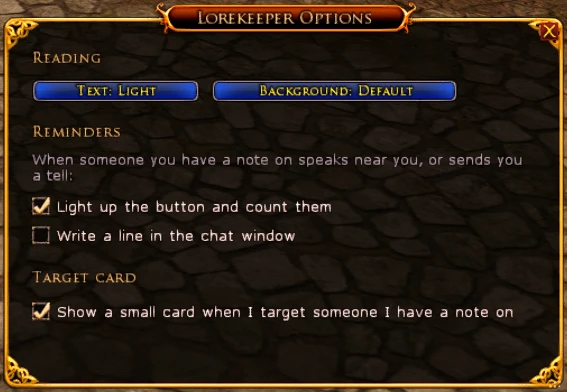
When they speak near you or send you a tell, the Lorekeeper button lights up with a count. Options can also add a line in chat.
How do I hide the card?
Click its x or press Escape. To turn cards off, untick Show a small card when I target someone I have a note on in Options.
Can I copy my notes?
Yes: select the text, or right-click a text box and choose Select all, then press Ctrl+C.
I deleted a note by mistake.
Right-click anyone in the list, or the Lorekeeper button, and choose Restore deleted note.
Does the Laurelin Archives see what I save in the plugin?
No. Everything the plugin saves stays on your own computer. LOTRO plugins can't go online, so the Laurelin Archives never receives anything you save or share within them.
Should I back up what I saved?
Yes, now and then. What the plugins save is kept in Documents > The Lord of the Rings Online > PluginData. Copy that folder somewhere safe from time to time, or take screenshots of what matters to you. If it is deleted, or you move to a new computer without it, what you saved is gone: the Laurelin Archives can't bring it back and can't be held responsible for lost data. Installing or updating from this page never touches that folder.
Can I install it on my phone?
No. Installing needs a computer or laptop with LOTRO on it. You can read this page on your phone, though.