The Beacon Plugin
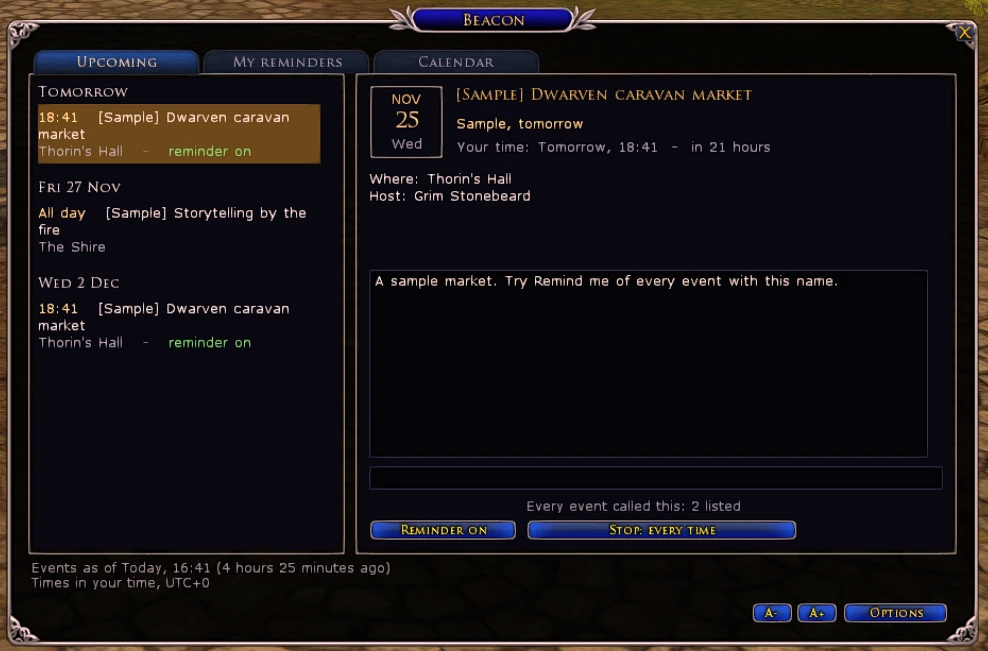
Beacon brings the events posted on Laurelin Archives into the game. See what is on today and in the weeks ahead, in your own time, and get a reminder before the events you care about start.
- Upcoming, My reminders and Calendar tabs, with where, when and who hosts
- Reminders 1 hour, 30, 15 or 5 minutes before, or when it starts: a popup card, a lit button or a line in chat
- Remind every time for events that come back with the same name
Use a computer for this
Installing needs a computer or laptop with LOTRO on it. Open this page there: laurelinarchives.org/plugins/beacon
A window opens. Go to Documents > The Lord of the Rings Online and click Select Folder.
An update is waiting: click Update Beacon.
Everything is up to date.
Installed.
In LOTRO, type /plugins manager, find Beacon in the list and press Load (or type /plugins load Beacon). Tick it to load automatically if you like. A small Beacon button appears on screen: click it, or type /beacon, to open the events. /beacon off hides the button and /beacon on brings it back.
In game, type /plugins unload Beacon and then /plugins load Beacon (or log in again) to use the new version. Your reminders and settings stay. The events list is replaced with the newest one.
This browser can't put files into your LOTRO folder, so there's no Install or Update button here.
In this browser, you download the plugin and unzip it into your Plugins folder yourself (the steps are below).
Download the plugin 0.1 MBorOpen this page in Microsoft Edge
Microsoft Edge comes with Windows: there, one click installs the plugin, and Update Beacon gets the newest. If this browser asks whether to open Microsoft Edge, say yes.
Or open this page in Google Chrome: there, one click installs the plugin, and Update Beacon gets the newest.
Install it from the download:
- Unzip it into Documents > The Lord of the Rings Online > Plugins (no Plugins folder there? Create it), so that you get Plugins > Beacon. On Windows: right-click the file, choose Extract All, click Browse, pick that Plugins folder, and check that the path ends in \Plugins: remove \beacon if Windows put it at the end.
- In LOTRO, type /plugins manager, find Beacon in the list and press Load. Tick it to load automatically if you like.
- A small Beacon button appears on screen: click it, or type /beacon, to open the events. /beacon off hides the button and /beacon on brings it back.
To update: download the plugin again and unzip it into the same Plugins folder, over the old one (choose Replace the files). Then, in game, type /plugins unload Beacon and then /plugins load Beacon (or log in again).
Unzipped the download and moving to Edge or Chrome later? Its Install Beacon then only fetches what has changed since.


Click a picture to see it full size.
Install it the first time
- Open this page on the computer where you play LOTRO, in Chrome or Edge.
- Click Install Beacon.
- If a window opens, go to Documents > The Lord of the Rings Online and click Select Folder. Installed another plugin from this site before? Then Beacon goes into the same folder without asking.
- If your browser asks, click Allow (or Edit files).
- Wait until the page says Installed.
- Start LOTRO. In the chat box, type /plugins manager, find Beacon in the list and press Load (or type /plugins load Beacon). Tick it to load automatically if you like.
- A small Beacon button appears on screen: click it, or type /beacon, to open the events. /beacon off hides the button and /beacon on brings it back.
- Click the Beacon button, pick an event and press Remind me.
- Choose how and when you are reminded in Options.
- Type /beacon test to see a reminder. /beacon help lists every command.
Plugins cannot go online, so new events arrive when you press Update on this page.
Get the newest version
- Come back to this page now and then. When it says an update is waiting, click Update Beacon.
- If your browser asks, click Allow.
- Then, in game, type /plugins unload Beacon and then /plugins load Beacon (or log in again). Your reminders and settings stay. The events list is replaced with the newest one.
Help
Why don't I see the newest events?
Press Update on this page, then type /plugins unload Beacon and /plugins load Beacon. The bottom of the window shows when the events were last updated, and warns you when they are more than a day old.
The times look wrong.
Installing or updating from this page tells Beacon your time zone. If you unzipped Beacon yourself, or the times are still off, type your offset from UTC, for example /beacon timezone +1. /beacon timezone auto goes back to automatic.
Why can't I set a reminder on some events?
Some events have a date but no exact start time, and Beacon can only remind you of an exact time.
How do I get a reminder for a weekly event?
Pick it and press Remind every time. Every event with the same name will remind you.
Can I be reminded of every event?
Yes: type /beacon all on, or tick Remind me of every event in Options.
How do I close a reminder card?
Press Dismiss, or press Escape.
Can I make the text bigger?
Use A- and A+. Options also has the text colour and a Default or Solid background.
Does the Laurelin Archives see what I save in the plugin?
No. Everything the plugin saves stays on your own computer. LOTRO plugins can't go online, so the Laurelin Archives never receives anything you save or share within them.
Should I back up what I saved?
Yes, now and then. What the plugins save is kept in Documents > The Lord of the Rings Online > PluginData. Copy that folder somewhere safe from time to time, or take screenshots of what matters to you. If it is deleted, or you move to a new computer without it, what you saved is gone: the Laurelin Archives can't bring it back and can't be held responsible for lost data. Installing or updating from this page never touches that folder.
Can I install it on my phone?
No. Installing needs a computer or laptop with LOTRO on it. You can read this page on your phone, though.